This page is for people using the Combine Opposites filter in the Causal Map app. It says what the filter does to the links, how to read the map it produces, which settings it has and where it goes in the filter chain. How to mark opposites when coding, which pairs to mark and how opposites differ from sentiment are on Combining opposites.
What the filter does#
Opposites coding is for when your data naturally contains paired factors like:
employedandunemployedgood healthandpoor healthfitandnot fit
If you treat those as unrelated labels, you can miss half the evidence when you search, filter or analyse. The filter unifies evidence across opposite-coded labels while still preserving which pole was originally claimed.
When the app combines opposites, it:
- rewrites every label which starts with
~onto the label without it, so~SmokingbecomesSmoking, whether or notSmokingis also coded - rewrites a label with a numbered tag, such as
Low income [~27], onto its partnerHigh income [27], but only when the partner is also present - keeps track of which end or ends of each link were flipped, so you can still interpret polarity.
We call a factor which now carries evidence about both poles bivalent.
No information is lost when you combine opposites; you can still always read off the original map from it.
Use the filter:
- when you have meaningful opposite pairs and you want analyses to “see both sides”
- when you want to compare stories like “X leads to improvement” and “~X leads to deterioration” without maintaining separate label families.
Reading a map with combined opposites#
Here are two stories, coded as-is. Where the speaker treats two things as opposites, we mark one with ~.
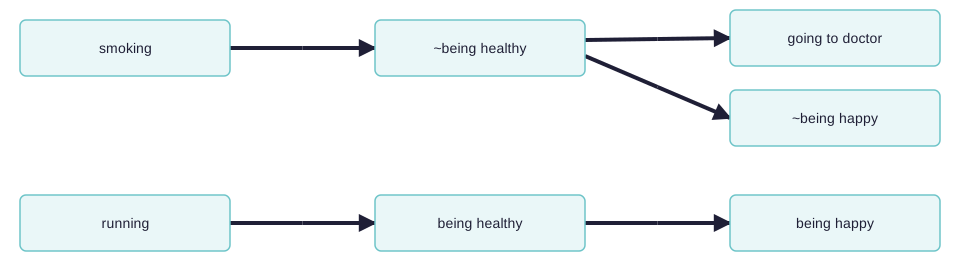
When you switch on the filter, the app looks at all the factors which begin with a ~ and takes off the ~.
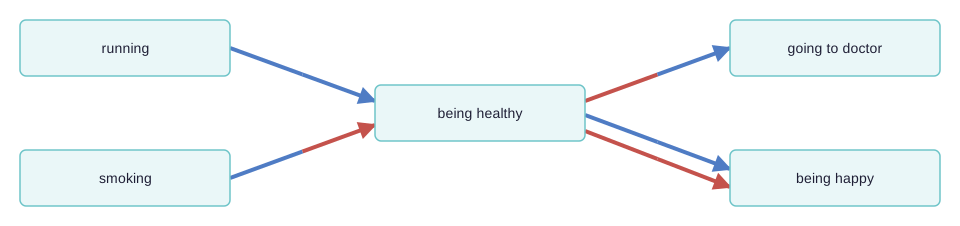
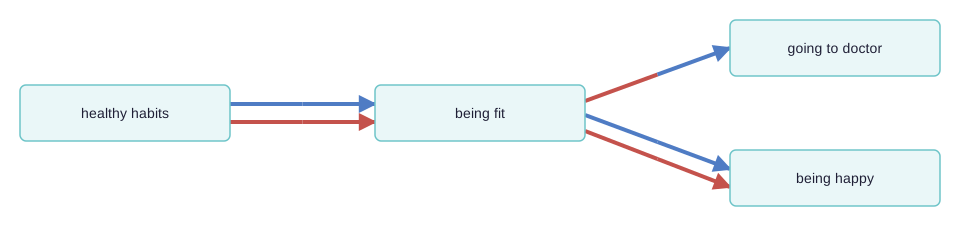
So now ~being healthy is combined onto being healthy, and ~being happy onto being happy. The ~ factors have their incoming and outgoing links preserved, and each arrow is now drawn in two halves, one next to the cause and one next to the effect. A half is blue where its factor was not flipped and red where it was flipped from ~. So the lower link from being healthy to being happy is red at both ends, because the factor at each end of the link has been flipped from “~Y” form to “Y” form; the influence factor was originally ~being healthy and the consequence factor was originally ~being happy. So there is no danger of thinking that this is really just another case of the other link, i.e. of being healthy leading to being happy. The link from smoking is blue at its tail and red at its head, and the link to going to doctor is red at its tail and blue at its head.
So, a link has two polarities: a from polarity and a to polarity. If the signs of the two polarities are opposite, then the effect of the influence factor on the consequence factor is reversed.
Both links from being healthy to being happy have the same overall polarity (normal, not reversed) but they do not represent the same information. Links are counted together only if they have the same from and to polarities, so there can be up to four different arrows from one factor to another. Why we do not subtract one kind of link from another is explained on Combining opposites.
Here is the same contrast on real data:


Opposites within a hierarchy#
With hierarchical coding, the sign “~” may appear at the start of a factor label and/or at the start of any component in a factor label.
Here is a similar story, now coded hierarchically. In this example, we only see ~ at the beginning of the factors, not yet within them.
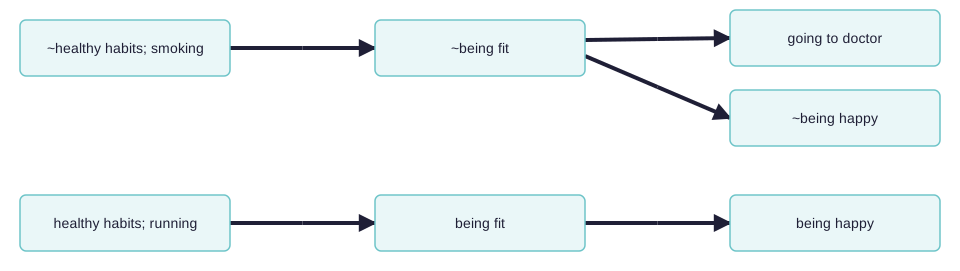
When you combine opposites, the app looks at all the factors which begin with a ~ and flips each component, taking off the ~ where there was one, and inserting one where there was not. Again it does this whether or not the opposite is also coded. So ~healthy habits; smoking becomes healthy habits; ~smoking. This flipping of every component applies to ~ labels only, not to numbered tags.
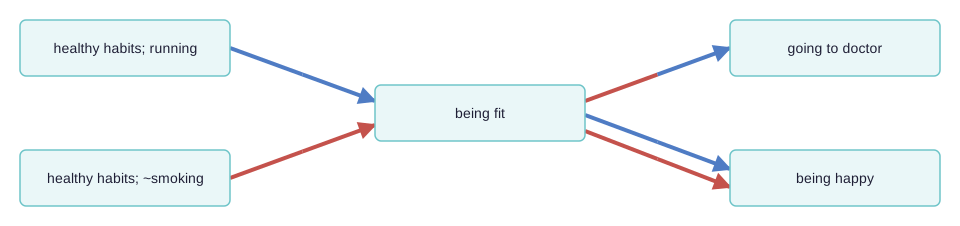
Here is the same example, but also “zoomed out” to the top level. The number on each arrow is its count of links.
Sometimes we need to use the ~ sign within the components of a hierarchy.
~Healthy habits; ~eating vegetablesis the opposite ofHealthy habits; eating vegetables. Not eating vegetables, which is an example of unhealthy behaviour, is the opposite of eating vegetables, an example of healthy behaviour.~Healthy habits; smokingis the opposite ofHealthy habits; ~smoking. Smoking, which is an example of unhealthy behaviour, is the opposite of not smoking, an example of healthy behaviour.
So here we add one more causal claim to our above example, at the bottom:
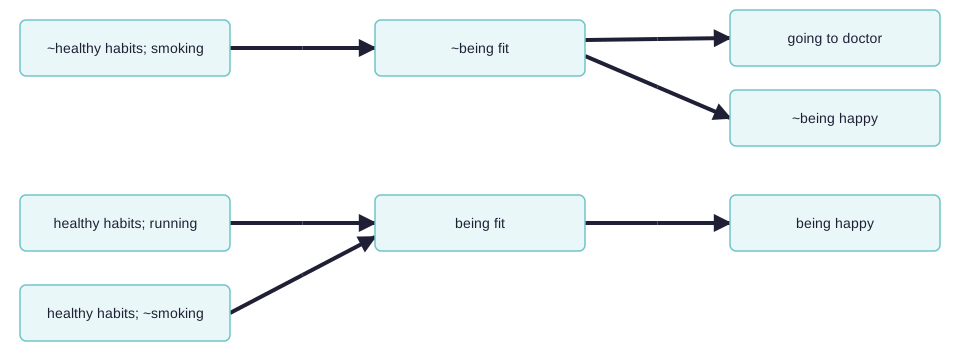
The healthy habit of not smoking leads to being fit.
So the app correctly detects that not smoking is the opposite of smoking:
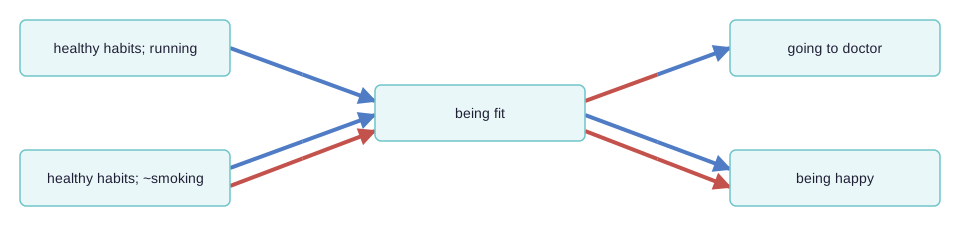
The two arrows at bottom left (one all blue, one all red) show that there is one example of this particular healthy habit leading to fitness, and the complementary example in which the opposite of this habit leads to the opposite of fitness.
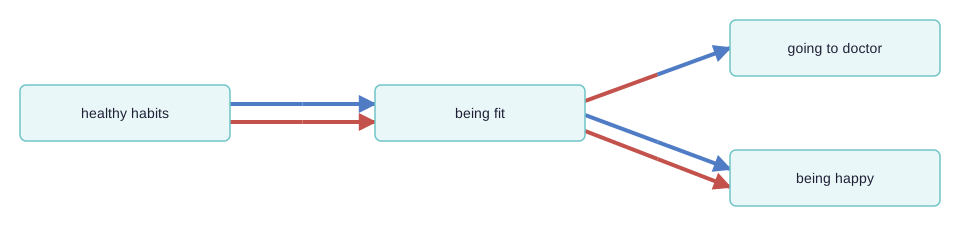
Zoomed out to the top level:
Settings#
- Bundling: Separate (the default) draws each flipped or unflipped variant as its own arrow, as in the maps above.
- Bundling: Together draws one arrow between each pair of factors. Each end is coloured by the average share of flipped links at that end, from blue through purple to red, and the label can give the count for each variant.
- Hide colours returns the map to its normal colouring and keeps the bundling and the labels.
The full list, including the choice between ~ labels and numbered tags, is in the app's help for the filter.
Where the filter goes in the chain#
Put the combining-opposites filter above any filter that replaces labels: removing brackets, collapse, soft relabelling, soft recode, clustering, auto recode. It finds each pair by reading the labels it is given, so once another filter has replaced them the markers are gone and it finds no pairs, quietly. Zoom is the exception, because it truncates the hierarchy and keeps the marker. This is rule 3 on filter ordering, and the app asks a question when a chain breaks it.
Transformation and interpretation rules#
Transformation rule#
- Input: a links table with factor labels which use opposite coding convention (for example
Wealthand~Wealth, or paired tags likeWealth [27]andPoverty [~27]). - Transformation: rewrite opposite-coded labels to one canonical label (just
Wealth) while storing, in the links pointing to or from these "flipped" labels, the information that the factor has been "flipped". - Output: a links table with unified bundles/rows that still preserve direction and polarity metadata.
Interpretation rule#
- Combining opposites merges evidence across poles for analysis convenience.
- It does not erase original meaning; polarity still matters for interpreting link direction/sign.
See also#
- Formatting your map for what you want to show for how this filter sits in a real workflow.
I sometimes use AI to help draft these pages, but the final text is ours.